Best Landscape Design Software
For Professionals and Homeowners
So what is some of the best landscape design software out there?
I didn't always use landscape design software for my designs. At one time, I did them all by hand. However, the only hand drawings I do lately are some quick elevation sketches while I'm designing as it gives me another perspective quickly.
I enjoy designing with software and do not find that it has any negative effect on my creativity. The best part of landscape design software for professionals and homeowners is the best ones simplify certain aspects and save you a lot of time.
Some designers say they prefer hand drawings. However, there is software out there that rivals this and to be able to make changes quickly is both a time saver and a money saver to clients. For homeowners...design software can be a lot of fun!
There is really no best landscape design software out there. Whether you are a homeowner or a professional, you have to choose the one that has features that are most important to you and that you find are relatively easy. After all, if it is too complicated to use...you never will!
I have personally tried all of them below, some more extensively than others. Most are for professionals while others, such as Sketchup, can be used by homeowners also. It's not that the others cannot be used by a homeowner. However, someone designing one project for their home may not want to pay for the more expensive programs. In addition, it may not be worth it to invest the time to become familiar with the design software.
Here are some of my
opinions of the best landscape design software to consider. Some are for
homeowners but most are for landscape contractors, landscape designers
and landscape architects.
Landscapers - if you need help with a landscape design drawing in AutoCad or Sketchup...
OR
Homeowners - if you are not up to tackling a design yourself and would like information on my design services...
Sketchup
Sketchup is definitely in the category of best landscape design software and it is free! It is 3D software used by all types of people...homeowners, landscapers, landscape designers, landscape architects, interior designers, architects, etc. Sketchup is an intuitive program with guides to help you along in the beginning. Google 3D Warehouse is where you find many free plants, outdoor amenities such as benches and pergolas, and anything you want to add to the design.
There is a free version and also a Pro version. Start out with
the free one as that is the only one that many will need.
Google Sketchup Review
3D Landscape Designs in Sketchup
Land FX
This program is definitely in my list of best landscape design software and is the one I use now. It becomes an add on to AutoCad or Bricscad (see below), so you must have both software programs. However, they offer a bundled price.
What I found interesting about Land FX is that at this time, it is the only software available that allows you to synchronize your AutoCad planting design with your Google Sketchup design. Make plant changes in AutoCad and with a few clicks, they will be automatically changed in your Sketchup 3D design and vice versa. In Land FX, you can choose the 3D plants in their library to automatically be used in the Sketchup drawing.
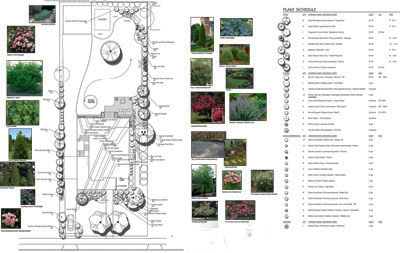
Landscape Design Using Photo Callout Feature
There are many, many other excellent features also. They have a huge library of plants, automatic plant labeling, plant scheduling (make a change to your drawing and you can automatically update your plant schedule), and much more.
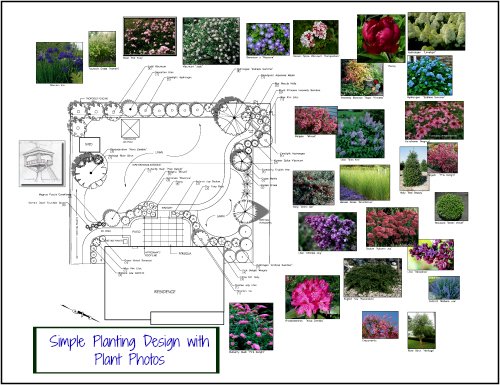
One of the great things you can do is add plant photos to your drawing. This is called the Plant Callout feature. Each photo is named and has a leader going to the related plant (the leaders can be turned off if you like).
How great to show your clients what each individual plant in your planting design looks like.
You choose the picture from Google images which comes up automatically. The above drawing is of a design I did recently where I used the photo feature. The automatic plant schedule is included on the right side. The plant schedule can also be created in Excel.
This software is for professionals.
One of my visitors was deciding between Land FX and Vectorworks. She wanted to know my thoughts...see what I wrote.
AutoCad
The name AutoCad is well known and often considered the best landscape design software used by all types of professionals. The array of things that you can do with this cad landscape design software is huge and very precise. It is a standard in software if you are working with other professionals such as architects, surveyors, engineers, etc. Landscape designers have to go a step further to get plant symbols, provide labeling, and plant lists.
Companies such as Land FX have chosen to integrate with AutoCad,
offering many landscape design specific features. Other landscape design
software companies now have an import function where you can import an
Acad drawing into their program. AutoCad is the most expensive one out
there to my knowledge.
Bricscad
This is an AutoCad copy cat, but it's good...at about a fraction of the AutoCad price.
Vizterra
Vizterra is 2D/3D software. Create in 2D and the software creates your design in 3D. But not so fast! This doesn't happen magically. You have to go through steps to enter the information so it knows what the 3D should look like.
For example, if you are creating a raised patio, you must indicate how high it will be. It also has a terrain modeling feature so where you can show grade changes. This software is good for landscape contractors and possibly designers. It is not inexpensive as there is a monthly membership fee, but you can cancel for the months you don't use it.
I found this software lacks the ability that designers might need such as detailed plant lists.
Visionscape
Visionscape is landscape design software that really captured my attention. Draw in 3D or design in 2D and the 3D design appears with a click of a button.
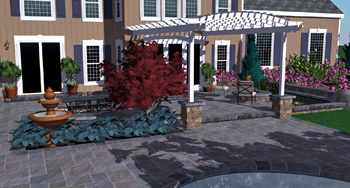
Visionscape Software
It is excellent, easy to use software for any type of landscape contractor who wants to present their designs or ideas in 3D. Landscape designers would benefit also, depending on the detail of the drawings they provide, although I felt as a landscape designer it was not for my purposes. It lacked some of the things that I needed.
However, some of the great features are instantaneous deck
design (including railings, steps, etc.), plants, and house building.
It even allows you to manipulate the land if needed. The plant materials
are pretty good. And it's fun! Pricing is not that expensive for this
type of software. There is a yearly membership fee. Try it out to see if
this is the best landscape design software for your needs.
Dynascape
This is software for landscape designers with lots of great features, but no 3D options. They do have a Sketchup module which offers a nice library of plants and also a feature that allows imports from AutoCad to be ready for modeling without tracing over.
The plant 3D components are very nice, but you will still have to
add the 3D plants manually in Sketchup, which is time consuming. Compare this to Land FX which does this automatically!
Some Ruby scripts (Sketchup ad-ons) will do the same, but not all at
one time. This is very expensive software, and it is for landscape
designers and contractors.
Vectorworks
Vectorworks is a program for professionals. You can create very nice
drawings with this software. However, it is pricey and has a large
learning curve, in my opinion.
I tried it out once and found it too time
consuming as it works very differently than AutoCad, which I was used
to. It is for landscape designers and contractors.
If you are looking for new software, check out this list.
So if you are looking for a new program to use or try, check out this list of best landscape design software. Most have free trials and some have ongoing webinars and tutorials.
If you are a homeowner and would like a drawing done for you and don't want to bother with it yourself, let me know and I will let you know my fee.
If you enjoyed this page, please share it!
Return From Best Landscape Design Software to Online Landscape Design
Landscape Design Advice Home
Helpful Ebooks by Susan