3D Garden Design Images and Videos
How do I create my 3D garden design images and movies?
I use a program called Sketchup for my 3D designs. There is a free version and one that you must pay for, which has a few more features. So it can be used by either homeowners or professionals!
However,
most of the time I create landscape plans in plan view first. Plan view
is a 2D design, where you view it as if you were above the property and
looking down on everything.
Google Sketchup
Landscaping Pictures and More 3D Videos
Once this is completed, I go to my 3D landscape software, Sketchup, and import the 2D design. This allows you to create the 3D image directly from the design, so that everything is accurate. For example, a patio would be the exact dimensions in the both the 2D and 3D designs. Plants would be placed in the correct positions. And so on.
However, you can also design directly in your 3D garden software, which I occasionally do.
- The plants I use are a special palette that I purchased separately. I
did so because I thought they were very artistic and gave an "artsy"
look to the images.
- You
can also use Google Warehouse, which is completely free, although
finding really good looking plants (if you are particular like I am) can
be difficult.
- One thing that is great about this program is that you can change hardscape materials easily.
The animations are created two different ways. The first way is an
animation through Sketchup. Various scenes can be saved, selected and
used for a 3D video. This is how the above video was created. You can
even position a person inside the house to see the view through a
window.
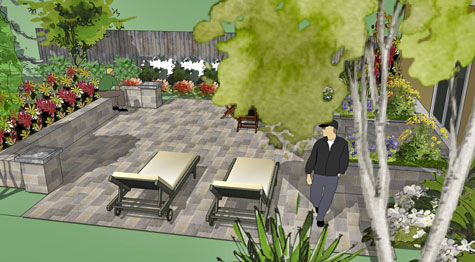
Do
you want to see what gray pavers will look like? Perhaps you are
considering natural stone or brick. Various materials can be
interchanged in this 3D landscape software to show different looks. Of
course, they are schematic, but even so, they offer different
impressions of various materials.
Ebooks by Susan
|
|



Click on any of my ebooks for more information. They all have been a great help to homeowners, contractors and landscape designers.

If you enjoyed this page, please share it!
Return From 3D Garden Design to Online Landscape Design
Landscape Design Advice Home